What Is a NAS? How to Build Your Own Personal Cloud Storage
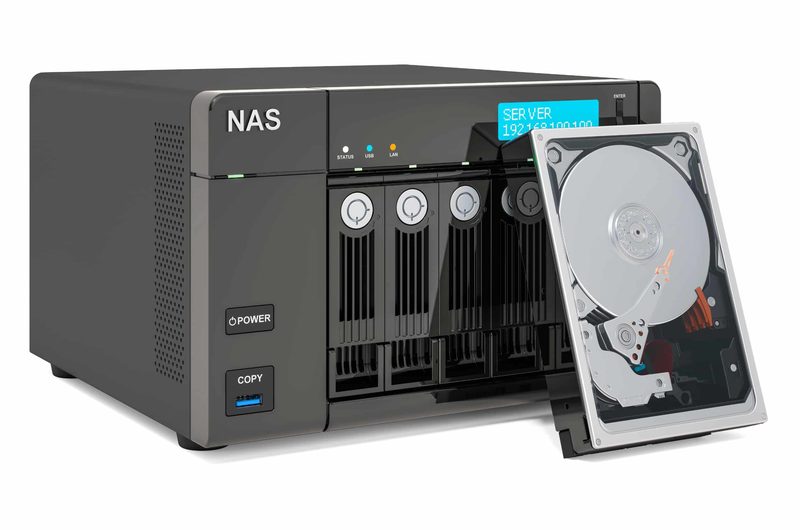
Your photos live on someone else’s servers, your subscription storage bill grows yearly, and a single hacked account could lock you out of your memories. A NAS, network-attached storage, is the alternative: your own personal cloud, a box of hard drives on your home network that stores terabytes of your data under your control. Once a tool for businesses and enthusiasts, NAS devices have become approachable enough for any tech-comfortable household. This guide explains what a NAS is, what it can do, and how to build your own.
What a NAS actually is
A NAS is a specialised small computer whose job is storing and serving files over your home network. It holds one or more hard drives, runs an operating system optimised for storage, and appears on your network as shared folders accessible from phones, laptops, TVs and tablets. Unlike an external hard drive plugged into one computer, a NAS is always on and available to every device, including when you are away from home via secure remote access. Unlike cloud storage, the hardware is yours: no monthly fees, no storage caps beyond the drives you install, and no company scanning your files. Think of it as a private Dropbox that lives in your house.
What you can do with one
A NAS earns its keep in several roles.
- Centralised backups: automatic backups of every family computer and phone to one safe place.
- Photo and video library: your entire media collection, accessible from any device, without cloud fees.
- Media server: stream movies and music to TVs and phones with software like Plex or Jellyfin.
- Private file sync: Dropbox-like syncing across devices with no third party involved.
- Surveillance storage: record IP camera footage locally instead of paying cloud plans.
- Personal projects: host a website, run home automation, or experiment with self-hosted apps.
For households generating terabytes of photos and video, the economics beat cloud subscriptions within a couple of years.
Buy or build: the two paths
Off-the-shelf NAS units from Synology, QNAP and Asustor offer polished software, mobile apps and effortless setup; a two-bay unit plus drives is the classic starter. They cost more but just work, with excellent backup and media apps. The DIY path repurposes an old PC or a mini-PC with TrueNAS or OpenMediaVault, free operating systems that turn any computer into a powerful NAS. DIY is cheaper and more flexible but demands comfort with installation and troubleshooting. For most first-timers, a two-bay commercial unit is the sweet spot: simple enough to set up in an evening, capable enough to grow with.
Drives, RAID and protecting your data
Storage planning has a few key concepts. Buy NAS-rated hard drives, designed for 24/7 operation and vibration resistance; standard desktop drives fail sooner in NAS duty. Start with two drives in RAID 1, mirroring, where each drive duplicates the other, so one drive can die without data loss. This is the simplest real protection and the recommended starting point. Understand RAID’s limit: it protects against drive failure, not against deletion, ransomware or fire; you still need an external backup of irreplaceable data, ideally offsite or in the cloud. Size for growth: media libraries expand relentlessly, so buy larger drives than today’s needs suggest. And put the NAS on a small UPS; power cuts during writes are a classic cause of corruption in India.
Setup, security and remote access
Initial setup is straightforward: install drives, connect to the router, and follow the web wizard to create storage pools and shared folders. Security deserves deliberate attention because a NAS on your network holds everything. Change default passwords immediately, enable automatic security updates, and use strong unique credentials. For remote access, prefer the manufacturer’s secure relay service or a VPN into your home network over exposing the NAS directly to the internet; exposed NAS devices are regularly attacked. Enable snapshots if offered: they let you rewind files after accidental deletion or ransomware. A well-secured NAS is a fortress; a neglected one is a target.
FAQs
How much does a NAS cost? A two-bay unit starts around 25,000 to 35,000 rupees before drives; two 4TB NAS drives add roughly 20,000 more. Total starter cost is typically 45,000 to 60,000 rupees.
Is a NAS better than Google Drive? For large volumes and privacy, yes. For convenient sharing and collaboration, cloud still wins. Many households use both: NAS as the archive, cloud for active sharing.
Can I access my NAS from outside home? Yes, through the manufacturer’s secure remote-access service or a home VPN. Never expose the admin interface directly to the internet.
A NAS is digital self-reliance: your files, your hardware, your rules. Start with two mirrored drives, secure it properly, and you will wonder why you ever rented your memories back from the cloud by the month.
Source: Wirecutter

Khabar 24h Editorial Desk — our explainers are prepared by the Khabar 24h editorial team using AI-assisted research tools, and every piece is reviewed by a human editor before publishing. We do not claim original reporting: our work is turning complex topics into simple, accurate summaries. Spotted an error? Write to contact@khabar24h.com — our corrections policy aims for same-day review.
More from this author →