Mechanical vs Membrane Keyboards: Which Should You Buy?
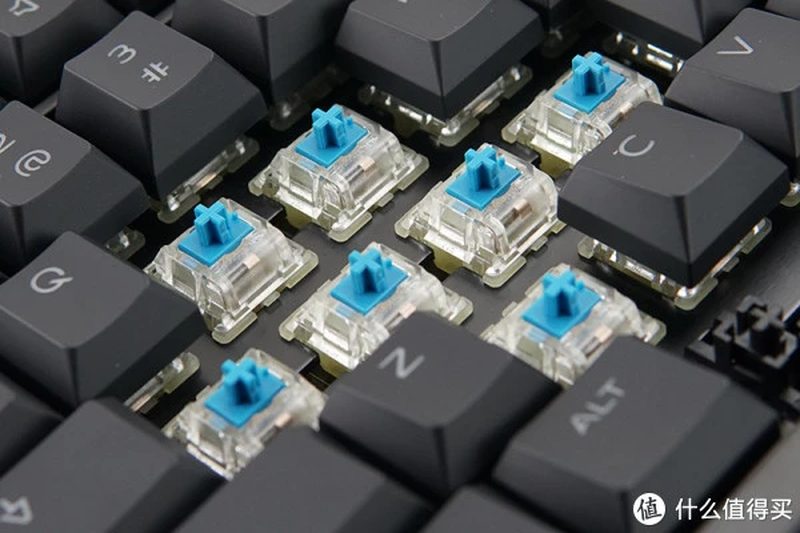
Ask a programmer or gamer about their keyboard and you may get a passionate lecture about switches, keycaps and the perfect thock. Beneath the enthusiasm lies a genuine choice that affects hours of daily typing: mechanical versus membrane keyboards. They work on entirely different principles, feel nothing alike, and suit different people. This guide explains how each type works, compares them honestly, and helps you decide which to buy.
How membrane keyboards work
Membrane keyboards, the kind bundled with most office computers and found in nearly all laptops, use three flexible layers: a top membrane with conductive traces, a spacer layer with holes, and a bottom membrane. Pressing a key pushes the top layer through a hole to contact the bottom, completing a circuit. A rubber dome under each key provides the spring-back. The result is a soft, quiet, mushy keystroke with a vague bottoming-out feel. Manufacturing is cheap, the design is thin and spill-resistant, and for casual typing it is perfectly adequate. The weaknesses are feel and longevity: the rubber domes degrade with use, keys become inconsistent, and the typing experience is uninspiring by design.
How mechanical keyboards work
Mechanical keyboards give every key its own individual switch: a self-contained mechanism with a spring, metal contacts and a sliding stem. Pressing the key compresses the spring until the contacts meet, registering the keystroke with a crisp, precise feel. Switches come in families: linear switches press smoothly with no bump, preferred by gamers for rapid keypresses; tactile switches add a noticeable bump at the actuation point, beloved by typists; clicky switches add an audible click for maximum feedback and maximum noise. Because each switch is independent and rated for tens of millions of presses, mechanical keyboards feel consistent for years and can be repaired key by key. The trade-offs are price, weight, height and noise.
Typing feel, noise and the daily experience
The difference is immediately physical. Mechanical keyboards offer precise actuation, you feel exactly when the key registers, which reduces bottoming out hard and can ease finger fatigue over long sessions. Key travel is longer and more satisfying, and the sound, from soft thock to sharp click, is part of the appeal for enthusiasts. Membrane keyboards are quieter, lower-profile and instantly familiar, but the mushy feel gives less feedback and heavy typists often pound keys harder to compensate. Noise deserves honest attention: clicky mechanical switches will annoy coworkers and family; even tactile switches are louder than membranes. In shared offices and Indian homes where someone always sleeps nearby, quiet linear switches or a membrane may be the considerate choice.
Durability, customisation and price
Mechanical keyboards win on longevity: quality switches are rated for 50 to 100 million keystrokes versus roughly 5 to 10 million for membrane domes, and individual switches and keycaps can be replaced. They also open the door to a vast customisation hobby: swappable switches, artisan keycaps, lubricated springs, custom layouts. Membrane keyboards win decisively on price and portability: decent ones cost a fraction of mechanical boards, weigh less and survive backpacks and spills better. For laptops the debate is moot, membranes and scissor switches rule thin designs, though external mechanical keyboards transform any desk setup. Gamers and heavy typists usually find the mechanical investment pays for itself in comfort; casual users rarely miss what they never had.
Which should you buy
Match the keyboard to your reality.
- Buy mechanical if: you type for hours daily, you game competitively, you value typing feel, or you want a keyboard that lasts a decade.
- Buy membrane if: budget is tight, you need quiet operation, you travel with the keyboard, or you type lightly and casually.
- Consider low-profile mechanical or quality scissor-switch keyboards as middle grounds.
- Try before you buy: switch testers are cheap, and feel is personal.
- For offices, choose quiet switches and respect your neighbours.
There is no objectively correct answer, only the right tool for your fingers, your ears and the people around you.
FAQs
Are mechanical keyboards better for gaming? Many gamers prefer them for precise actuation and faster response, especially linear switches. But skill matters far more than hardware.
Do mechanical keyboards last longer? Yes, substantially. Individual switches outlast membrane domes many times over and can be replaced individually.
Why are mechanical keyboards so expensive? Individual switches, sturdier construction and smaller production scales cost more than stamped membrane sheets. Entry-level mechanical boards have become quite affordable, though.
Membrane keyboards are appliances; mechanical keyboards are instruments. Either can serve you well, but now you know exactly what your fingers are choosing between.
Source: Tom’s Hardware

Khabar 24h Editorial Desk — our explainers are prepared by the Khabar 24h editorial team using AI-assisted research tools, and every piece is reviewed by a human editor before publishing. We do not claim original reporting: our work is turning complex topics into simple, accurate summaries. Spotted an error? Write to contact@khabar24h.com — our corrections policy aims for same-day review.
More from this author →