How to See What Google Knows About You: Using Your Privacy Dashboard
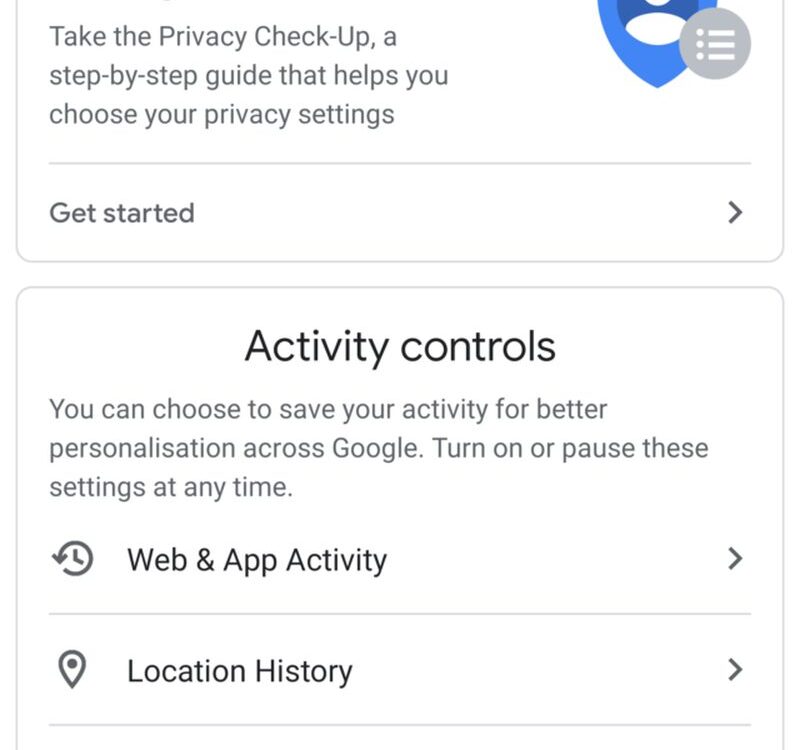
Google knows where you went last Tuesday, what you searched at 2 am, which YouTube videos you could not stop watching, and probably what you are about to buy. This is not a conspiracy theory; it is the documented function of your Google account, which quietly logs an astonishing range of activity to personalise ads and services. Most users have never looked at this dossier, though Google provides a full dashboard to inspect it. Opening your privacy controls for the first time is a genuinely eye-opening experience, and taking control takes less time than you fear. Here is how to see what Google knows about you and decide what it gets to keep.
What data does Google collect?
The scope is broad because Google’s services are everywhere. Web and App Activity logs your searches, the sites you visit in Chrome, and your activity in apps like Maps and Assistant. Location History, now called Timeline, records where your phone goes, building a map of your life accurate to the metre. YouTube History tracks every video you watch and search. Voice recordings from Assistant interactions are stored as audio. Gmail content, Drive files, Photos with their location metadata, and your advertising profile, the interests Google has inferred about you, complete the picture. Individually each log improves a service; together they form one of the most detailed behavioural records ever assembled on a private citizen, which is exactly why inspecting it matters.
How to open your privacy dashboard
Everything lives at myaccount.google.com, in the “Data and privacy” section. Start with “My Activity” (myactivity.google.com): this is the raw log, searchable and filterable by service and date, showing your searches, watched videos, location visits and assistant queries going back years. Next, open “Timeline” to see your location history rendered as a map; for many people this is the most startling page Google offers. Then check “Ad personalisation” settings to see the interests Google has assigned you, age bracket, topics, inferred purchasing habits. Review each with fresh eyes and ask the simple question: am I comfortable with this existing? Most people answer no to at least some of it, which is where the controls come in.
The settings that matter most
Three controls do most of the work.
- Auto-delete: for Web and App Activity, Location History and YouTube History, set auto-delete to 3 months instead of the default that keeps data far longer. This single change bounds your exposure automatically.
- Pause collection: you can turn off Location History, YouTube History or Web and App Activity entirely. Services keep working, with slightly less personalisation.
- Delete selectively or wholesale: My Activity lets you delete by date range, by service, or everything. The nuclear option exists and works.
- Ad personalisation: turn off personalised ads to stop Google using your profile for targeting; you will still see ads, just less creepy ones.
- Third-party access: review which apps and sites have access to your Google account and revoke the ones you do not recognise.
What changes when you lock things down?
Honesty requires admitting the trade-offs. Pausing Location History means Timeline stops recording your travels and location-based reminders get dumber. Turning off Web and App Activity makes search and Assistant less personalised; you will repeat context the system used to remember. YouTube recommendations get less eerily accurate. For most people these are minor costs, and many find the services perfectly usable, even pleasantly less clingy. The one thing that does not change: Google still needs some data to operate, and account security features like suspicious-login detection keep working. Privacy here is a dial, not a switch, and the right setting is the one you chose deliberately rather than inherited by default.
Beyond Google: the bigger picture
Google is the biggest dossier but not the only one. Run the same audit on your other accounts: Apple’s privacy settings, Meta’s ad preferences and off-Facebook activity page, Microsoft’s privacy dashboard. Each offers activity logs and deletion controls most users never open. The pattern across all of them is identical: generous defaults for collection, capable controls buried a few clicks deep, and a business model that hopes you never look. An annual privacy audit, one evening a year across your main accounts, is the realistic maintenance schedule. You will not achieve invisibility, but you will achieve something better: a data footprint that reflects your choices instead of your inattention.
FAQs
Does deleting my activity actually delete it? Google says deleted activity is removed from your account and its systems, with some anonymised or aggregated data retained. Deletion from your view is immediate; backend purging follows their retention schedules.
Will Google still track me without an account? Less precisely, but yes through cookies, IP addresses and device signals. Privacy controls work best combined with tracker blocking and careful sign-in habits.
Is pausing history enough, or should I delete old data? Do both: pause or auto-delete going forward, and delete the historical backlog once. Old data is the part you have already forgotten about, which makes it the riskiest.
Your Google account holds a mirror to your digital life, more detailed than your memory and more honest than your diary. Looking into it once, setting auto-delete, pausing what you do not need, is fifteen minutes that pays off for years. The data was always yours; the dashboard just finally lets you act like it.
Compiled by the Khabar 24h Editorial Desk from publicly available sources.

Khabar 24h Editorial Desk — our explainers are prepared by the Khabar 24h editorial team using AI-assisted research tools, and every piece is reviewed by a human editor before publishing. We do not claim original reporting: our work is turning complex topics into simple, accurate summaries. Spotted an error? Write to contact@khabar24h.com — our corrections policy aims for same-day review.
More from this author →