What Is Ransomware? How It Locks Your Files and How to Stay Safe
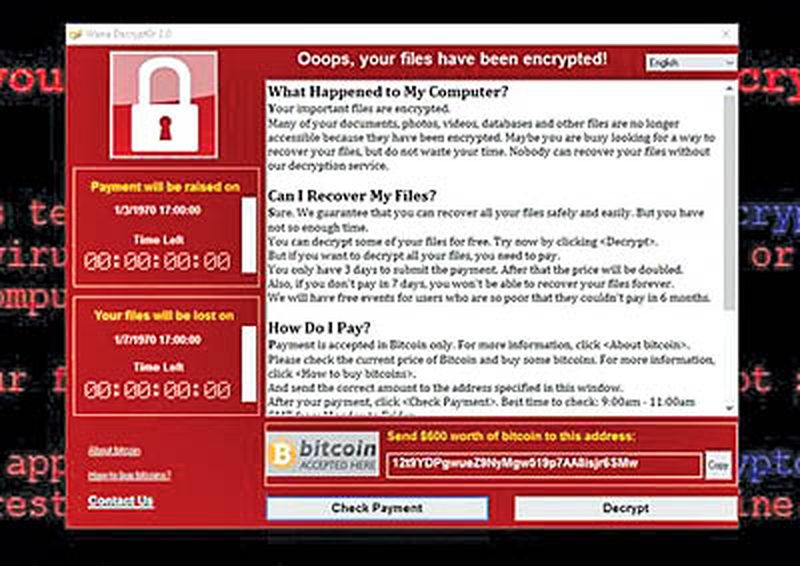
Imagine opening your laptop to find every document, photo and spreadsheet encrypted, with a message demanding payment in cryptocurrency for the key. That is ransomware, the most damaging form of cybercrime for businesses and increasingly for individuals too. Hospitals, municipal corporations and small businesses in India have all been hit, sometimes losing weeks of work. This guide explains what ransomware is, how infections happen, how to protect yourself, and what to do if the worst happens.
What ransomware does
Ransomware is malicious software that encrypts a victim’s files with strong cryptography, making them unreadable, and then demands a ransom, usually in cryptocurrency, for the decryption key. Modern attacks go further with double extortion: criminals first steal sensitive data, then threaten to leak it publicly if the ransom is not paid, pressuring victims who could otherwise restore from backups. Some variants also spread across networks, encrypting every connected computer in an organisation within hours. The ransom demands range from thousands of rupees for individuals to crores for companies. Payment, authorities stress, does not guarantee recovery; many victims pay and receive nothing, or are targeted again.
How infections happen
Ransomware rarely breaks through firewalls like in movies; it walks in through ordinary human actions.
- Phishing emails with malicious attachments or links remain the most common entry point.
- Pirated software and fake cracks frequently bundle ransomware with the promised free programme.
- Exposed remote desktop services with weak passwords let attackers walk straight into company networks.
- Unpatched software: known vulnerabilities in operating systems and applications are exploited at scale by automated tools.
- Malicious ads and compromised websites can trigger drive-by downloads.
- USB drives and infected installers in small offices without IT oversight.
Every one of these has a corresponding defence, which is the encouraging part.
How to protect yourself
Defence against ransomware is mostly good hygiene, not expensive products. Keep operating systems and software updated; patches close the vulnerabilities ransomware exploits. Use reputable antivirus or endpoint protection and keep it current. Be ruthlessly sceptical of email attachments and links, especially unexpected ones. Avoid pirated software entirely; the hidden cost can be everything on your disk. Use strong, unique passwords and two-factor authentication on important accounts. For businesses, the critical extras are network segmentation, so one infected machine cannot reach the whole network, restricted admin privileges, and regular security training, because employees are both the weakest link and the best defence.
Backups: the ultimate defence
Backups are what turn ransomware from a catastrophe into an inconvenience. Follow the 3-2-1 rule: three copies of important data, on two different media, with one copy offline or offsite. For individuals, this means cloud backup plus an external hard drive that is disconnected after backing up; ransomware encrypts connected drives too, so an always-plugged-in backup is no backup. Test restores occasionally; a backup you have never restored from is a hope, not a plan. Businesses should add immutable backups that cannot be altered even by administrators, and rehearse recovery procedures. With good backups, the correct response to ransomware is to wipe the machines and restore, no ransom required.
If you are infected: what to do
Act quickly and in the right order. Disconnect the infected device from the network immediately, unplug ethernet and turn off Wi-Fi, to stop the spread. Do not pay the ransom as a first resort; report to the police and the cybercrime portal, and check identifiers like the ransom note against databases of known variants, because free decryption tools exist for some older ransomware families. Photograph the ransom note and preserve logs for investigators. Then wipe the device completely and reinstall from clean media; merely deleting the malware is not trustworthy. Restore data from backups. For businesses, engage incident-response help rather than improvising, and review how the attacker entered to close the hole.
FAQs
Should I ever pay the ransom? Law enforcement advises against it: payment funds crime, often fails to recover data, and marks you as a payer for future attacks. Treat it as an absolute last resort.
Can ransomware infect phones? Mobile ransomware exists but is far less common than on computers; the bigger mobile threats are spyware and banking trojans.
Are free decryption tools real? Yes, for some older ransomware families, security firms and police collaborations publish free decryptors. Always check before considering payment.
Ransomware is a business, and like any business it follows the path of least resistance. Updated software, sceptical clicking and real backups make you unprofitable to attack, which is the only defence that scales.
Compiled by the Khabar 24h Editorial Desk from publicly available sources.

Khabar 24h Editorial Desk — our explainers are prepared by the Khabar 24h editorial team using AI-assisted research tools, and every piece is reviewed by a human editor before publishing. We do not claim original reporting: our work is turning complex topics into simple, accurate summaries. Spotted an error? Write to contact@khabar24h.com — our corrections policy aims for same-day review.
More from this author →