How to Edit Videos on Your Phone: Best Free Apps for Beginners
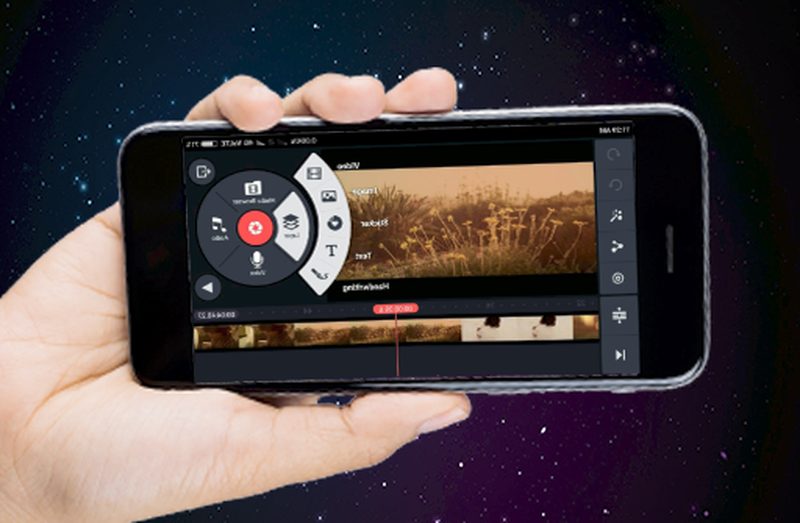
Some of the most-watched videos on the internet were edited entirely on a phone, on a metro ride, between classes, or on a bedroom floor. Phone cameras have become genuinely excellent, and the editing apps have caught up: what once required expensive desktop software now happens with a few taps. Whether you want to make Instagram Reels, YouTube videos, family montages or a small business promo, learning how to edit videos on your phone is one of the most useful creative skills you can pick up in 2026. And the best tools for beginners are free.
What can phone editing apps really do?
Modern free editing apps are far more capable than most beginners expect. You can trim and rearrange clips on a multi-track timeline, add transitions, overlay text and captions, adjust colour and brightness, mix background music with your original audio, record voiceovers, apply filters and effects, and export in full HD or 4K for YouTube, Instagram or WhatsApp. The paid desktop programs still win for complex projects, multi-camera edits and fine colour grading, but for the short-form video that dominates the internet in 2026, a phone app is not a compromise. It is the native tool for the job, and its limitations mostly force the kind of tight, punchy editing that audiences prefer anyway.
Best free video editing apps for Android
Android users are spoilt for choice. CapCut is the most popular free editor in India for good reason: it is genuinely free, packed with trendy effects, auto-captions and templates, and designed around the vertical videos that dominate Reels and Shorts. VN Video Editor is the favourite of slightly more serious beginners, offering a proper multi-track timeline, keyframe animation and no watermark without charging. YouCut is a lighter option for quick trims and merges. Google Photos even includes a basic editor good enough for simple family videos. One caution: free apps sometimes add watermarks or push paid features, so check the export screen before you invest hours in a project.
Best free video editing apps for iPhone
iPhone owners get one unbeatable advantage: iMovie comes free from Apple and is the perfect first editor, with an intuitive timeline, decent titles and transitions, and no watermark or upsell. CapCut is equally strong on iOS and is the go-to for trend-driven short video with its effects library and auto-captioning. VN is available on iPhone too and suits beginners who want room to grow. For quick social clips, Instagram’s own editor and YouTube’s Shorts editor handle filming-to-posting in one place. The iPhone’s hardware also means smoother 4K editing than most Android phones at the same price, so do not be afraid to shoot in higher resolution.
A simple workflow for your first videos
Editing feels overwhelming until you follow the same steps every time.
- Shoot with editing in mind. Record short clips of 5 to 15 seconds rather than one long take; it makes trimming far easier and gives you natural cut points.
- Assemble first, polish later. Drop your clips onto the timeline in order and watch the rough cut before touching effects, music or text.
- Cut ruthlessly. Remove every second that does not earn its place. Beginners almost always leave videos twice as long as they should be.
- Add captions. A large share of viewers watch with sound off, so auto-captions or manual subtitles dramatically increase watch time.
- Mix your audio. Lower background music under speech so voices stay clear, and normalise volume across clips.
- Export for the platform. Use 1080p vertical (9:16) for Reels and Shorts, and 1080p or 4K horizontal (16:9) for YouTube.
What mistakes do beginners always make?
The classic beginner errors are remarkably consistent. Overusing transitions and effects is the biggest one: a hard cut beats a flashy star-wipe in almost every situation. Second is ignoring audio; viewers forgive shaky video but click away from bad sound within seconds, so record in a quiet place or use a cheap lapel mic. Third is vertical-versus-horizontal confusion: shoot vertical for Reels and Shorts, horizontal for YouTube, and decide before you press record. Fourth is music copyright: use the app’s built-in royalty-free library or YouTube’s audio library, because a Bollywood track will get your video muted or taken down. And finally, perfectionism: your first twenty videos will be rough, and that is the tuition fee everyone pays.
FAQs
Do I need to pay for a good editing app? No. CapCut, VN and iMovie handle the vast majority of beginner and intermediate needs for free. Pay only when you consistently hit a specific paid feature’s limits.
Can a phone handle 4K editing? Most mid-range and premium phones from the last few years can, though exports take longer and use more storage. Start with 1080p; it looks great on phones and uploads faster.
How long does it take to learn? The basics, trimming, captions and music, take an afternoon. Developing an eye for pacing takes a few dozen videos. Start publishing early and improve in public.
The barrier to making videos has never been lower: the camera, the studio and the editing suite are all the same device in your pocket. Pick one free app, learn its timeline, shoot something this weekend, and accept that the first attempts will be imperfect. Every creator you admire started exactly there.
Source: NDTV Gadgets 360

Khabar 24h Editorial Desk — our explainers are prepared by the Khabar 24h editorial team using AI-assisted research tools, and every piece is reviewed by a human editor before publishing. We do not claim original reporting: our work is turning complex topics into simple, accurate summaries. Spotted an error? Write to contact@khabar24h.com — our corrections policy aims for same-day review.
More from this author →