How to Speed Up a Slow Laptop: Fixes That Actually Work
Every laptop slows down eventually. The machine that once booted in seconds now takes minutes, browsers stutter with a dozen tabs open, and even opening a file feels like a negotiation. The usual advice, buy a new one, is expensive and often unnecessary: in most cases a slow laptop is suffering from a handful of fixable problems, and the fixes that actually work are either free or cost far less than a replacement. This guide walks through the software clean-up steps that restore speed on both Windows and Mac, the two hardware upgrades that matter most, and how to tell when a laptop is genuinely beyond saving.
Why do laptops slow down in the first place?
Laptops slow down for a few predictable reasons, and almost none of them are mysterious. The most common is a full or nearly full drive: when storage drops below about 10 to 15 per cent free space, the operating system struggles to manage temporary files and virtual memory. The second is too many programs launching at startup, each one stealing a slice of memory and processor time before you have even opened anything. The third is a mechanical hard drive: laptops that still spin a traditional HDD instead of an SSD feel ancient next to anything modern. Add in years of accumulated browser extensions, outdated drivers, dust-clogged cooling fans that force the processor to throttle, and occasionally actual malware, and you have the complete anatomy of a slow machine.
Software fixes that actually work
Start with the free stuff, because it often solves the whole problem. First, free up disk space: uninstall programs you no longer use, move large photo and video libraries to an external drive or the cloud, and run the built-in Disk Cleanup on Windows or check Storage settings on a Mac. Aim to keep at least 15 to 20 per cent of your drive empty. Second, trim your startup programs. On Windows, open Task Manager, go to the Startup apps tab, and disable everything you do not need at boot. On a Mac, check Login Items in System Settings. Third, update everything: Windows Update, macOS updates, and your browser. Updates frequently include performance fixes, and an ancient browser with forty extensions is a classic speed killer, so audit your extensions ruthlessly. Fourth, run a malware scan with Windows Security or a reputable scanner; unwanted crypto-miners and adware are a surprisingly common cause of sudden slowdowns. Finally, restart your laptop properly instead of just closing the lid. Weeks of accumulated sleep sessions leave memory fragmented, and a genuine restart clears it.
The two hardware upgrades that matter
If software clean-up is not enough, two upgrades deliver the biggest speed improvement per rupee on older laptops.
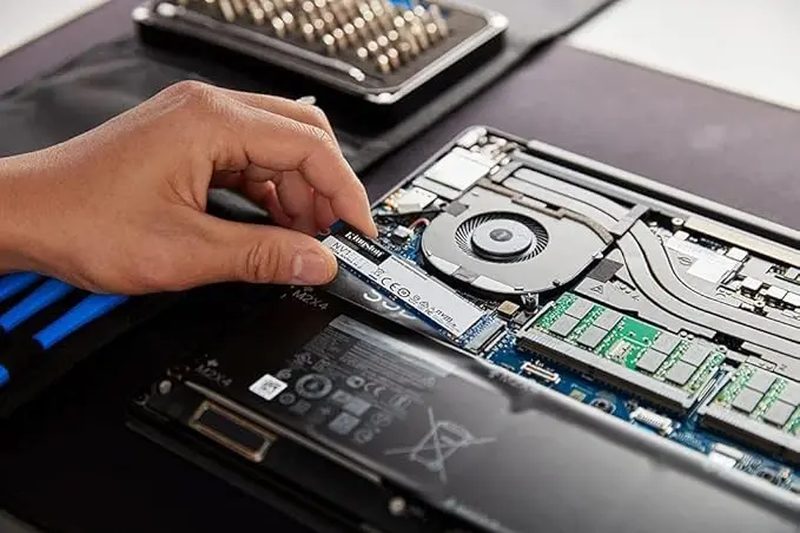
- Replace the hard drive with an SSD. This is the single most transformative upgrade in computing. Swapping a spinning HDD for a solid-state drive can cut boot times from minutes to seconds and make the whole machine feel five years younger. A 512 GB SATA SSD is inexpensive in 2026, and many local shops will do the swap and clone your data for a small fee.
- Add more RAM. If your laptop has 4 GB of memory, moving to 8 GB or 16 GB smooths out multitasking dramatically. Check whether your model allows RAM upgrades first, many thin ultrabooks have memory soldered in, but most mainstream laptops from a few years ago have an accessible slot.
- Clean the cooling system. Dust in the fans and dried-out thermal paste make processors overheat and throttle. A service-centre cleaning every couple of years is cheap and can restore performance that heat stole.
- Replace a dying battery. A swollen or worn battery can cause throttling and sudden shutdowns; a fresh battery is far cheaper than a new laptop.
When should you replace instead of repair?
Some laptops are not worth saving. If the machine is more than eight years old, no longer receives operating system security updates, or needs a motherboard or screen replacement that costs half the price of a new machine, replacement is the rational call. The same goes if the processor itself is the bottleneck: no amount of RAM fixes a chip that cannot handle modern video calls and browsers. A good rule of thumb is the 50 per cent rule: if repairs cost more than half the price of a comparable new laptop, buy the new one. And if your work depends on the machine, factor in the cost of your own time spent fighting a dying laptop.
FAQs
Will reinstalling Windows or macOS speed up my laptop? Usually yes. A fresh install wipes years of accumulated clutter and is the closest thing to a factory reset for performance. Back up your files first, and keep a list of the programs you actually need.
Do “PC cleaner” apps help? Mostly no. Aggressive registry cleaners and optimiser apps rarely help and sometimes cause damage. The built-in tools in Windows and macOS do the job safely.
How long should a laptop last? Five to seven years is realistic for a well-maintained machine, with an SSD and RAM upgrade often extending that. Business-grade laptops tend to outlast budget consumer models.
A slow laptop is usually a fixable laptop. Work through the free software fixes first, consider the SSD and RAM upgrades if the machine is otherwise healthy, and only spend on a replacement when the maths clearly favours it. An afternoon of maintenance can easily buy you two more years with a machine you already know and like.
Source: The Verge

Khabar 24h Editorial Desk — our explainers are prepared by the Khabar 24h editorial team using AI-assisted research tools, and every piece is reviewed by a human editor before publishing. We do not claim original reporting: our work is turning complex topics into simple, accurate summaries. Spotted an error? Write to contact@khabar24h.com — our corrections policy aims for same-day review.
More from this author →